Settings
The Settings screen has five sub-panes accessible from the left rail.
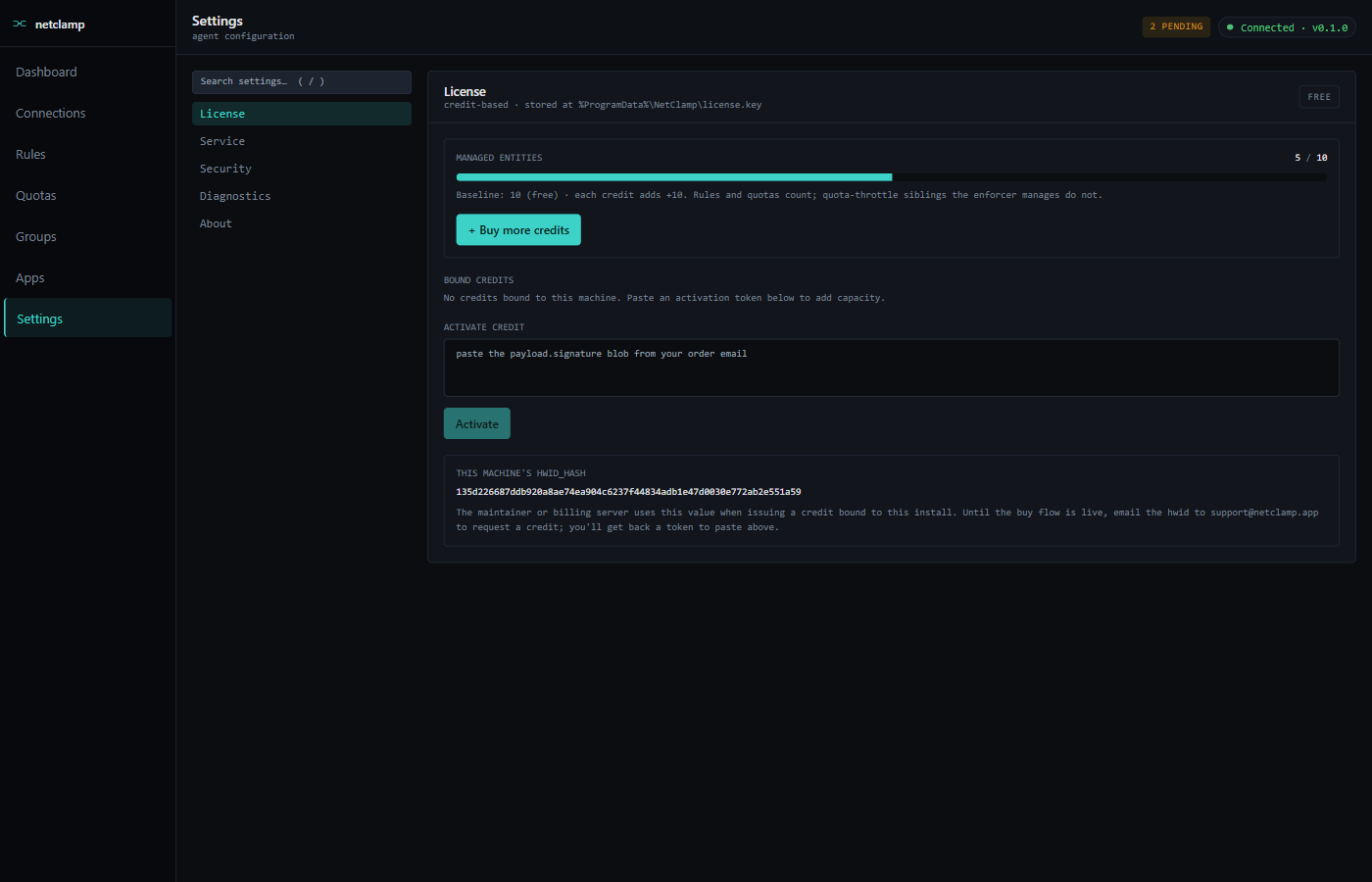
License
-
Managed entities —
<used>/<cap>progress bar. Free baseline is 10, each credit adds +10. Throttle-sibling rules created by quotas don’t count. -
Bound credits — credits currently bound to this machine’s HWID.
-
Activate credit — paste a
payload.signatureblob (delivered by email after purchase or after a transfer). Activation is instant. -
+ Buy more credits — opens a checkout modal that takes you to Lemon Squeezy. After payment the service polls for the mint completion and auto-activates the credit.
-
HWID hash — this machine’s 64-character BLAKE3 of stable hardware identifiers. Required when issuing a credit so the token is bound to this install. See Credit licensing.
Service
-
API bindings — REST + gRPC listen addresses. Default
127.0.0.1(loopback only). Non-loopback works at any credit count, but TLS is not yet implemented — only bearer-token auth. Don’t expose the interface to untrusted networks until TLS ships. -
Logging — log level (
trace/debug/info/warn/error) and max log files retained. Logs live atC:\ProgramData\NetClamp\logs\. -
Default policy — separate toggles for block inbound by default and allow outbound by default. Toggling outbound default off while connected remotely can lock you out — there’s a confirmation guard in the SPA.
-
Save changes writes
C:\ProgramData\NetClamp\config.tomland asks the service to hot-reload (no restart for most fields).
Security
-
API token — currently-active bearer. Reveal/Copy buttons. Rotate token generates a new one and revokes the old; every paired browser and CLI session will need the new token.
-
Forget this browser — clears the token from this browser’s localStorage. The service token is untouched; other paired browsers and the CLI keep working.
Diagnostics
Power-user view toggles, stored per-browser:
-
Show
pending_deleterules — surfaces rules whose WFP filter can’t be removed yet (typically because of a BFE stall or sublayer fight with another firewall). Useful when triaging stuck deletes.
More toggles will land here as future phases ship.
About
Static read-out of build + runtime state:
Version |
Semver of the installed |
Uptime since |
ISO timestamp the service last started. |
WFP active |
|
Active rules |
Same count shown on the Dashboard. |
Active connections |
Same count shown on the Dashboard. |
Monitored apps |
Processes the network monitor is tracking. |
Total blocked |
Cumulative |
Links |
Source repo, changelog, privacy policy. |